The working sheets are ISO A1 and A3 in metric practice, and ARCH D or ANSI D in the US. This week the desk holds two separate sets. One is a 48 m terrace for a UK client, issued on A1. The other is a coordination set on ARCH D for a US consultant.
Pick the sheet from the building's length at the scale you need, and keep one size for each set. The terrace runs through this guide as the worked example, from the first fit test to the half-size copies.
Key takeaways
- Size the sheet from its drawing space, not its trimmed size. ISO 5457 leaves 574 × 811 mm inside the frame of an A1 sheet.
- If your title block runs full height, it costs 18 m of building at 1:100. Take it off before you test the fit.
- A1 to A3 and ANSI D to ANSI B are exact halves. ARCH D to 11 × 17 is a 0.458 reduction that no scale rule reads.
- The letter E is ambiguous: Illinois State calls the 30 × 42 in sheet Arch F, while Duke calls the same sheet ARCH E.
- Choose the smallest sheet that keeps the largest drawing clear, then use it for every sheet in the set.
ISO A sizes and the drawing space ISO 5457 leaves
Every A sheet is the one above it cut in half, so the proportion never changes. Markus Kuhn's paper size reference gives the rule: height divided by width is root two for every format, and A0 covers one square metre. For drawings, that fixed proportion is what matters.
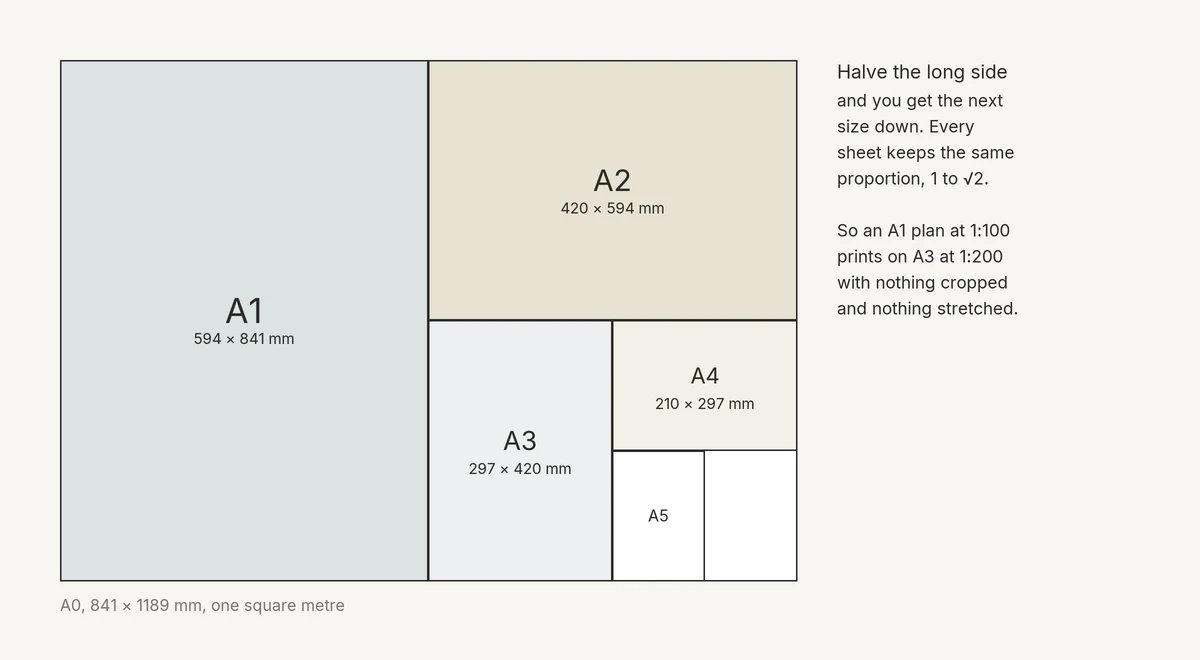
The trimmed sheet is not the area you draw on. ISO 5457, adopted without deviations as IS 10711:2001, sets a 20 mm border on the left edge, including the frame, as a filing margin. All other borders are 10 mm wide.
Table 1 of the standard gives the drawing space inside that frame.
| Sheet | Trimmed size (mm) | Drawing space inside the frame (mm) |
|---|---|---|
| A0 | 841 × 1189 | 821 × 1159 |
| A1 | 594 × 841 | 574 × 811 |
| A2 | 420 × 594 | 400 × 564 |
| A3 | 297 × 420 | 277 × 390 |
| A4 | 210 × 297 | 180 × 277 |
The standard also says "Elongated sizes should be avoided." When a long building outgrows its sheet, move up a size in the series rather than ordering a strip.
The title block then takes a slice of that drawing space. ISO 7200, published as IS 11665:2009, fixes only its width: 180 mm, to fit an A4 sheet, with the same block used for all paper sizes. On A4 the block fills the full drawing width.
Many offices reserve the block as a full-height strip down one side. A corner block costs less length, because the drawing can run above it. On A0, a full-height strip still leaves 979 mm of free length.
The fields and the sheet numbering are covered in the guide to the architectural title block.
ARCH and ANSI sizes in inches, and the 30 × 42 naming conflict
US sheets come in two inch series, ANSI and ARCH, and both use the letters D and E for different sheets. The table lists every US size in the standards cited below, with ISO A1 in inches for comparison.
| Sheet | Size (in) | Listed by | Note |
|---|---|---|---|
| ANSI A | 8.5 × 11.0 | A/E/C Graphics Standard | Letter in the Illinois State list |
| ANSI B | 11.0 × 17.0 | A/E/C Graphics Standard | Tabloid in the Illinois State list |
| ANSI C | 17.0 × 22.0 | A/E/C Graphics Standard | - |
| ANSI D | 22.0 × 34.0 | A/E/C Graphics Standard | Required drawing sheet in that standard |
| ANSI E | 34.0 × 44.0 | A/E/C Graphics Standard | - |
| ISO A1 | 23.4 × 33.1 | A/E/C Graphics Standard | For international projects in that standard |
| ARCH C | 18 × 24 | Illinois State | - |
| ARCH D | 24 × 36 | Illinois State, Duke | Construction drawing sheet at Los Alamos |
| ARCH E | 36 × 48 | Illinois State | LANL letter, size not stated |
| 30 × 42 sheet | 30 × 42 | Illinois State, Duke | See below |
Owner standards settle on different sheets. The A/E/C Graphics Standard from the US Army's CAD/BIM Technology Center requires ANSI D sheets, and ISO A1 sheets for international projects.
Los Alamos National Laboratory's CAD Standards Manual puts its construction drawings on ARCH D. New facilities with a base floor plan of 50,000 sq ft or larger may use a sheet the manual calls ARCH E. That needs approval from the laboratory's CAD standards contact.
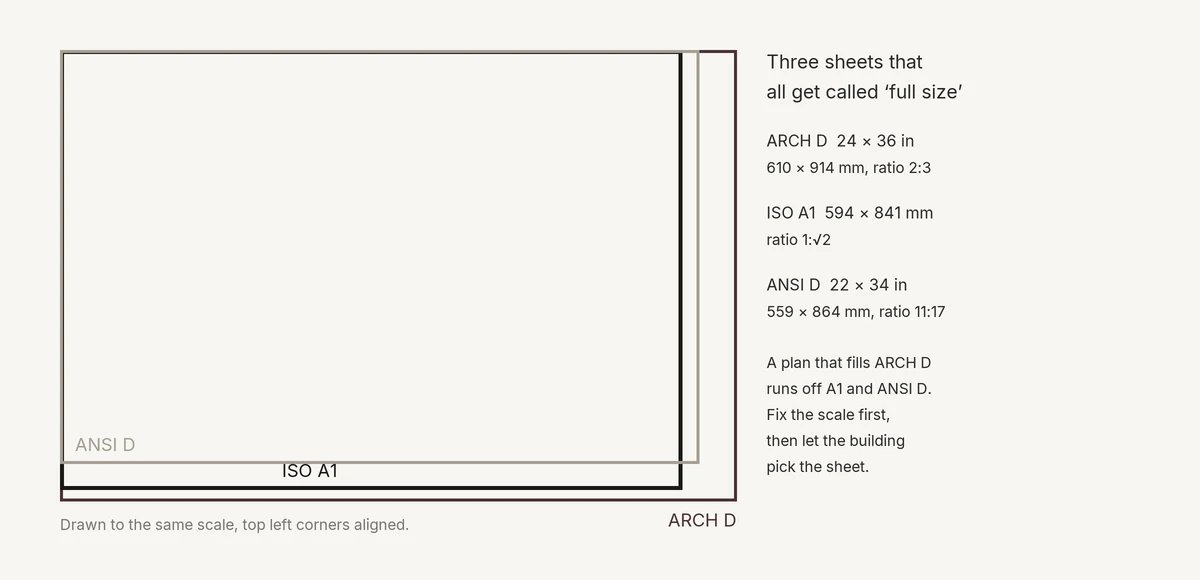
A1 sits close to both D sheets and matches neither. A layout made for one will not move to another at the same scale without a gap or a crop. ARCH D works out at 610 × 914 mm, rounded, when a metric office has to set it up.
The trouble starts above ARCH D. Illinois State University's CAD Standards Manual lists Arch E as 36 × 48 and Arch F as 30 × 42.
Duke's CAD Standards Guideline calls the same 30 × 42 sheet ARCH E, and names it the preferred size. The two standards contradict each other. An order for an E sheet can mean 36 × 48 in one office and 30 × 42 in the next.
Write the inches on every print order, transmittal and title block. Add the millimetres when a metric consultant is on the job, and call the 30 × 42 sheet by its size.
How much building fits on each sheet
At 1:100, the drawing space of an A1 sheet holds 81.1 m of building on its long side, before the title block. To test any sheet, convert the building to paper: drawing length in mm = building length in m × 1000 ÷ scale denominator. Compare the result with the drawing space, less the title block.
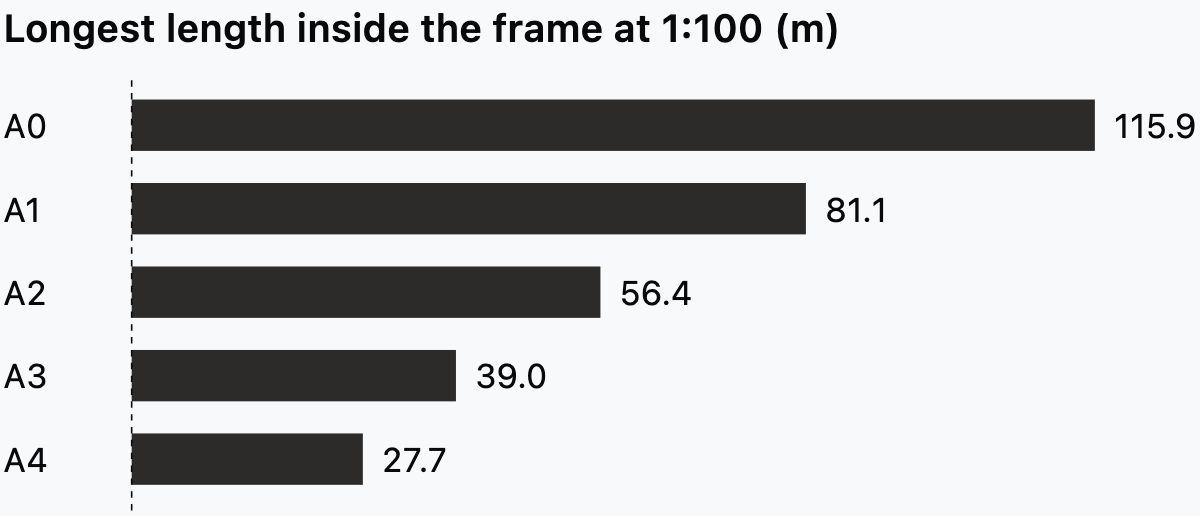
The chart stops at the frame. If the ISO 7200 block runs full height, it costs 18 m of building at 1:100 and 9 m at 1:50. With that strip, A1 keeps 631 mm of length, or 63.1 m at 1:100.
Other scales and the two US D sheets work out as below. The ISO rows use the drawing space. The US rows use the whole sheet, before the title block and the 3/16 in edge clearance in the A/E/C Graphics Standard. At 1/8 in = 1 ft, one inch of paper carries 8 ft of building.
| Sheet | Scale | Area measured | Building that fits |
|---|---|---|---|
| A3 | 1:50 | Drawing space | 19.5 × 13.9 m |
| A1 | 1:50 | Drawing space | 40.6 × 28.7 m |
| A1 | 1:200 | Drawing space | 162.2 × 114.8 m |
| ANSI D | 1/4 in = 1 ft | Whole sheet | 136 × 88 ft |
| ARCH D | 1/4 in = 1 ft | Whole sheet | 144 × 96 ft |
| ANSI D | 1/8 in = 1 ft | Whole sheet | 272 × 176 ft |
| ARCH D | 1/8 in = 1 ft | Whole sheet | 288 × 192 ft |
Which scale suits which drawing is a separate decision, covered in the guide to architectural drawing scales. Fix the scale the drawing needs, then let the building choose the sheet.
Example: a terrace of six houses
Take the terrace from the opening: six houses, 48 m long and 11 m deep. At 1:100 it draws at 480 × 110 mm. A2 has 564 × 400 mm of drawing space, so the plan fits beside a corner title block. A full-height strip leaves only 384 mm of length, and the terrace does not fit.
Even beside a corner block, A2 leaves just 84 mm of length for dimension strings. A1 leaves 631 mm beside a full-height strip, so the plan fits at 1:100 with room for dimension strings and a key.
At 1:50 the terrace is 960 mm long. That rules out A1 and calls for A0, where 1159 mm less a full-height strip leaves 979 mm. Only 19 mm is spare, which is tight once dimension strings go on. A corner block on A0 gives back the full length.
So the building sets the sheet. Issue the general arrangement on A1 at 1:100, or move the whole set to A0 if the client wants every plan at 1:50.
If the plan is already drawn in Synaps, draw a paper over it at the chosen size and scale. Only shapes fully inside its bounds become the paper's content, so a wing that runs past the edge stays out of the sheet.
Half-size sets: which reductions keep a true scale
A half-size print keeps a standard scale only when the small sheet is exactly half the large one. Three common reductions pass that test and one fails.
| Reduction | Sides compared (in or mm) | Factor | A 1/4 in or 1:100 plan prints at |
|---|---|---|---|
| A1 to A3 | 594 to 297, 841 to 420 | 0.5 | 1:200 |
| ANSI D to ANSI B | 22 to 11, 34 to 17 | 0.5 | 1/8 in = 1 ft |
| ARCH D to 11 × 17 | 24 to 11, 36 to 17 | 0.458 | About 0.115 in per foot |
| ARCH D to 12 × 18 | 24 to 12, 36 to 18 | 0.5 | 1/8 in = 1 ft |
The terrace passes. Its A1 general arrangement at 1:100 prints on A3 at 1:200, so the client's A3 copies still scale.
The ARCH D row is the one that catches offices out. The short side sets the factor at 11 ÷ 24, because the long side's 17 ÷ 36 = 0.472 would crop the sheet. A 1:50 plan on ARCH D lands at about 1:109 on 11 × 17.
The LANL CAD Standards Manual chose ARCH D partly for "ANSI B" size reproduction use by Operations. The arithmetic above says an ARCH D sheet reduced onto ANSI B holds no standard scale. Treat those copies as reading copies, not drawings to scale from.
The Illinois State manual points the same way: drawings there must be capable of being plotted "clearly and legibly" at 8.5 × 11 and 11 × 17.
Put a graphic scale bar on every sheet that may be reduced. A bar shrinks with the drawing, so it stays true at any factor. Mark an odd reduction "not to scale" on the print itself.
Dimension text that survives the reduction is covered in the guide to floor plan dimensions. For half-size copies that go out for markup, see the guide to redline drawings.
Use one sheet size for the whole set
Choose one sheet size from the largest drawing in the set, and use it for every sheet. The LANL manual states the rule directly: "Use a consistent size of drawing sheet throughout the Drawing Set."
ISO 5457 sets the other limit: the original drawing should be made on "the smallest sheet permitting the necessary clarity and resolution".
Put the two rules together. Find the drawing that needs the most length, usually the site plan or the longest floor plan. Pick the smallest sheet that keeps it clear, and every other sheet follows.
One size keeps the title block in one place, the fold the same and the print run in one batch. A half-size copy then reduces every sheet by the same factor, so one scale bar note covers the set. In Synaps, a drawing holds many papers on one canvas, and several papers export together as one combined PDF.
A detail booklet on A3 works as a separate document with its own register. The consultant's ARCH D coordination set is the same case: a separate set at its own size. Inside one set, keep to one size.
Set up the sheets for a job in Synaps
Synaps publishes this article. Synaps is browser-based architectural design and drafting software, and each sheet is a paper you size and scale on the canvas.
The job is the week from the opening: the terrace set on A1, and the US consultant's coordination set on ARCH D, kept as a separate set.
- Press F for the Paper tool and click two corners on the canvas. The paper snaps to standard sheet sizes as you drag.
- Select the paper by its header. Under Format, pick A1, or any ISO size from A0 to A6 or B0 to B5.
- For the consultant's coordination set, set a custom size instead. ARCH D is a custom 610 × 914 mm paper.
- Set the Scale, such as 1:100, and use Swap width/height for a landscape sheet.
- Draw the rest of each set's papers at that set's size, over the plans each one carries.
- Shift-select the A1 papers' headers, open Export, choose PDF and leave Combine into one PDF on.
- Export the ARCH D papers the same way as their own PDF. For a consultant who works in CAD, choose DXF instead, which gives one file per paper. The guide to CAD file formats covers what DXF carries.
Frequently asked questions
What should a print order say about sheet size?
Give the sheet in inches or millimetres, the orientation and the print factor. Write "50 per cent" or "100 per cent" rather than "half size", so the print room cannot guess at the target sheet.
Why does a half-size PDF sometimes print slightly under half?
Fit to page lets the printer shrink the sheet to clear its own unprintable margin. Print at actual size onto the matching sheet, or set the reduction factor yourself.
Should text be sized for the full sheet or the half-size copy?
Size it for the print most people will read. If the team and the client mostly see A3 copies of an A1 set, choose text heights that still read at half size. Let the full sheet look generous.
Does a US consultant on an ISO job need the same sheet?
No, but agree both sheets in writing at the start. Name them in the appointment, so each set folds, files and reduces in a predictable way.