A bubble diagram in architecture maps spaces and their links before any walls are drawn. Draw area-true bubbles, zone them, test them, then square them up. On the desk sit a room schedule and an adjacency matrix for a two-bedroom flat, and a roll of trace.
That flat is the worked example. Its schedule and matrix come from our space planning guide to room schedules and adjacency, and this guide starts where that one stops. The squared-up sheet at the end is your first plan, early in the schematic design phase.
Key takeaways
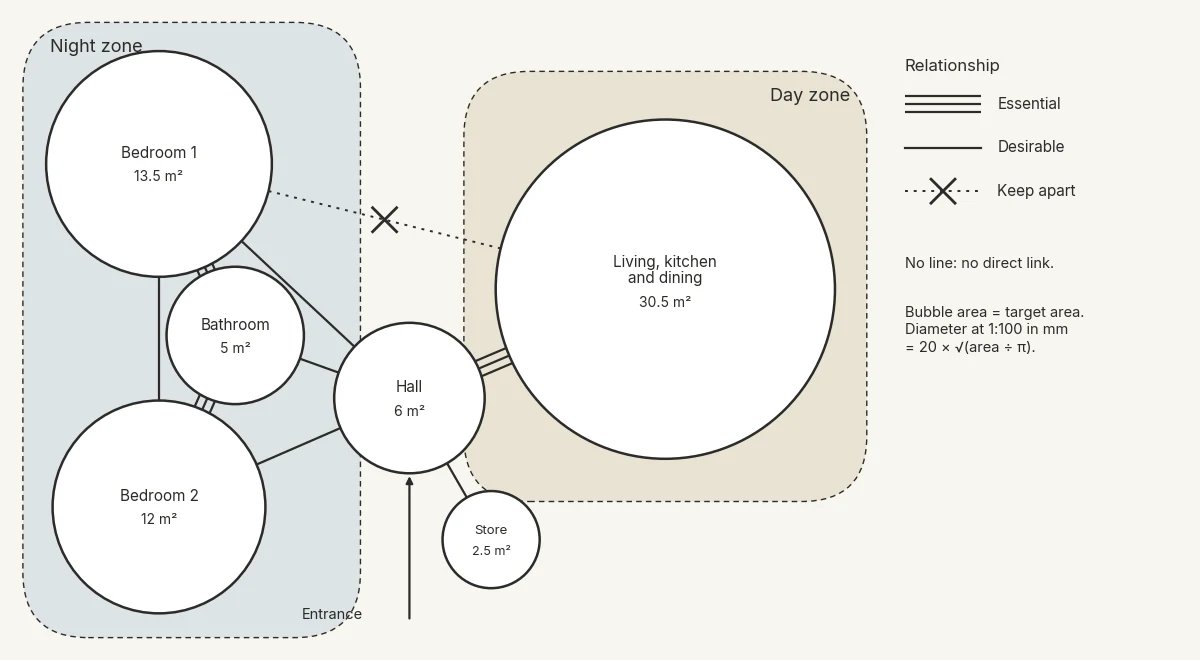
- Draw each bubble at its target area. The diameter is 2 × √(area ÷ π), so a 13.5 m² bedroom is 41 mm across at 1:100.
- Fix one legend first: a triple line for essential, a single line for desirable, a dotted line with a cross for keep apart.
- Group the bubbles into a day zone and a night zone around the hall, with the entrance as the anchor.
- Run a pass or fail test before any wall: essential pairs touch, no route crosses another room and habitable rooms reach the facade.
- Square each bubble into a rectangle of the same area, then feed every fix back into the schedule.
What a bubble diagram shows, and what it leaves out
A bubble diagram shows which spaces exist, how big each one is, which pairs belong together and where you come in. Walls, room shapes, structure and exact positions stay off the sheet. A circle has no proportion to argue about, so the discussion stays on relationships.
A CUNY City Tech course brief for ARCH 3610 sets the order: a list of spaces, an adjacency matrix, then the bubble diagram. The brief says "A bubble draws information from the adjacency matrix."
When a bubble diagram is worth drawing
Draw one when the arrangement is still open. A schedule and a matrix tell you what each room needs, but not where it goes. Four situations call for one:
- The site, orientation or outlook pulls rooms in competing directions.
- The entrance position is not fixed, or the plan has two possible entrances.
- More than one arrangement fits the brief, and you need to compare them.
- A client or a colleague needs to see the reasoning before a plan.
Skip it when the arrangement is already fixed, as in a repeat flat type in a known core, or a fit-out the shell already decides.
How to draw a bubble diagram in six steps
Work from the schedule outwards, with one decision per step:
- List every space with its target area, including the hall and storage.
- Size each bubble from its target area.
- Place the entrance and the hall first.
- Draw the relationships with a fixed legend.
- Mark daylight, outlook and the north point.
- Draw a second arrangement before you choose one.
List every space with its target area
The ARCH 3512 course page at CUNY City Tech asks students to "List all spaces and their functions, including rooms, circulation spaces, and outdoor areas." Give the hall and the store their own target areas.
Size each bubble from its target area
On size, the same page says "Consider the size and importance of each space to determine the size of the bubble that represents it." Importance is a weak guide. A bathroom matters a great deal and still needs only 5 m² here. Draw the area instead.
A circle with the target area has a diameter of 2 × √(area ÷ π). At 1:100, the diameter in millimetres is 20 × √(area ÷ π).
The example's six rooms work out as below. The targets suit a mid-market brief and are not a standard.
| Room | Target area | Bubble diameter | Diameter at 1:100 |
|---|---|---|---|
| Living, kitchen and dining | 30.5 m² | 6.23 m | 62 mm |
| Bedroom 1 | 13.5 m² | 4.15 m | 41 mm |
| Bedroom 2 | 12.0 m² | 3.91 m | 39 mm |
| Entrance hall | 6.0 m² | 2.76 m | 28 mm |
| Bathroom | 5.0 m² | 2.52 m | 25 mm |
| Built-in storage | 2.5 m² | 1.78 m | 18 mm |
Set a compass to half the last column, or cut the circles from card and slide them around before anything is inked.
Place the entrance and the hall first
Start with an arrow for the entrance on the access side, then put the hall bubble on it. Every other room hangs off the hall, so its position fixes the rest. Place the largest space next, against the best outlook or the balcony.
Draw the relationships with a fixed legend
Fix the legend before the first line, and keep it the same on every option. A CUNY City Tech assignment sheet gives one published convention. A triple line means "Must be adjacent", a double line "Should be adjacent" and a single line "Would be Nice".
All three grades are positive, so nothing marks rooms that should stay apart. This guide ties its legend to the three ratings in the space planning guide's adjacency matrix:
- A triple line means essential: a shared wall or a direct door.
- A single line means desirable: a short route that crosses no other room.
- A dotted line with a cross means keep apart: no shared door and, where you can, a buffer.
- No line means no direct link.
Bedroom 1 and the living space carry the dotted cross, so they go into different zones.
Mark daylight, outlook and the north point
Every habitable room should touch the diagram's outer edge, which becomes the facade. The bathroom and the store can sit inboard. Add a north point, the sun path and arrows for outlook. Mark noise too, such as the street side or a lift core next door.
Draw a second arrangement before you choose one
Draw at least two arrangements, and change one big move per version: the entrance side, the day zone's orientation or the bathroom's position.
Group the bubbles into zones
Draw a loose outline around rooms that share privacy, hours of use or services. Those outlines are zones, and they fix the plan's big moves before any room has a shape. Drawn alone, they make a zoning diagram. This is functional zoning inside the building, not land-use zoning.
The example flat has a day zone for the living, kitchen and dining space and a night zone for the bedrooms and bathroom. The hall is the hinge, with the store off it.
Read the keep-apart lines against the outlines. Every dotted cross should run between two zones, never inside one. A cross inside a zone means the zone holds the wrong rooms.
Test the diagram before you draw walls
Run this test on each arrangement before anyone draws a wall. Each row is pass or fail, drawn from studio practice rather than a published standard:
- Does every essential pair touch, or sit close enough to share a wall?
- Can you reach every room from the hall without crossing another room?
- Does every keep-apart pair sit in different zones, with no shared door and, where you can, a buffer?
- Does every habitable room touch the outer edge?
- Do the target areas, plus room for internal walls, fit the whole-flat target?
- Does each bedroom reach the bathroom inside the night zone? The hall counts as part of that route, but a route through the living space fails.
The example rooms total 69.5 m² against the flat's 74 m² target, which leaves 4.5 m² for internal walls. If the shell is already drawn in Synaps, the Measure tool's Area mode reads its area without adding anything to the drawing.
Keep the arrangement that passes most rows. A failed row is still useful: redraw, or write the trade into the schedule so the client sees the choice.
The example flat passes all six rows as circles. Circles can touch at a single point, though, so a pass on paper can still fail once rooms get corners.
Turn the bubble diagram into a scaled first plan
Square each bubble into a rectangle of the same area, then close the gaps and overlaps between them.
Square each bubble into a rectangle of the same area
Fix the narrow side first. The bed, the wardrobe and the door set a bedroom's width, and the length follows from the area. Bedroom 1 at 2.75 m wide needs 4.91 m of length to keep its 13.5 m². The living, kitchen and dining space works at 4.5 × 6.78 m.
In Synaps, type each rectangle's exact width and height with the Rectangle tool, so the sheet keeps its target areas.
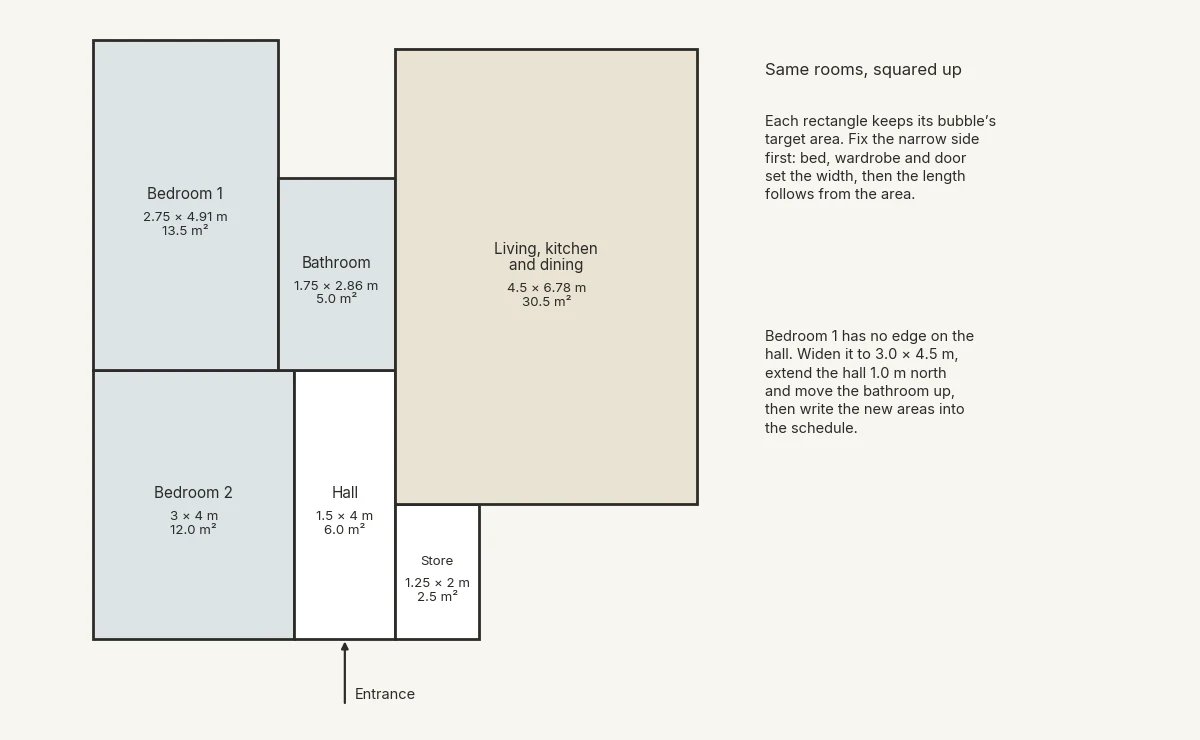
The squared sheet shows three problems. First, bedroom 1 has no edge on the hall, so its route crosses the bathroom or bedroom 2 and fails row two.
Widen bedroom 1 to 3.0 × 4.5 m, still 13.5 m², with its east edge in line with bedroom 2 and the hall. Extend the hall 1.0 m north to give bedroom 1 a 1.0 m edge for its door. Move the bathroom up 1.0 m, where it becomes 1.5 × 3.33 m, still 5.0 m², between bedroom 1 and the living space.
Second, bedroom 2 meets the bathroom along only 0.25 m, a shared wall in name only. After the move, bedroom 2 reaches the bathroom through the hall, so record that essential link as a trade in the schedule.
Third, the bathroom shares its whole east edge with the living space, 3.33 m after the move. That keep-apart pair has no buffer, so accept a wall with no door and write that trade into the schedule.
Turn link lines into doors and a hall
Each triple line becomes a shared wall, with a door where the pair needs a direct link. Each single line becomes a route through the hall. Gaps between rectangles become hall or storage, and overlaps become shared walls. The guide to floor plan symbols and door swings covers how those doors read on plan.
The hall's width now depends on the doors that open off it. In England, Approved Document M Volume 1 sets the baseline for new dwellings under requirement M4(1), visitable dwellings. Paragraph 1.15 says door and hall widths "should comply" with its rules, to make habitable rooms and an entrance-storey WC easier to reach.
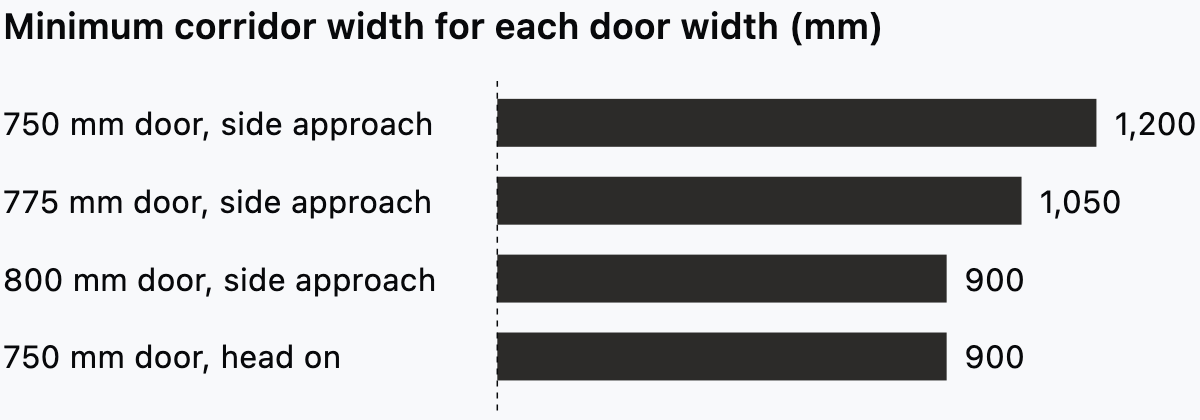
In Table 1.1, a 750 mm door approached from the side needs a 1,200 mm corridor, while an 800 mm door needs 900 mm.
Paragraph 1.15 also covers localised obstructions, such as a radiator. Each should be no longer than 2 m and not sit opposite or close to a doorway. The corridor should not narrow below 750 mm at any point. So 750 mm is the minimum at a pinch point, not the corridor width for door approaches.
A narrow hall forces wider doors, and a wider hall allows narrower ones. The example hall is 1.5 m wide, which clears every row. Outside England, local rules govern, and none of this is legal advice.
Read the areas back against the schedule
Fixes move area and walls take thickness, so read both back. Extending the hall 1.0 m north adds 1.5 m², so the hall becomes 1.5 × 5.0 m, or 7.5 m². The rooms now total 71.0 m² against the 74 m² target. That leaves 3.0 m² for internal walls, down from 4.5 m².
The rectangles here sit on wall centrelines. Give bedroom 1 a 100 mm partition on one long side and one short side. Each takes 0.05 m, half its thickness, off the room. The clear size drops from 3.0 × 4.5 m to 2.95 × 4.45 m, or 13.1 m². On those two partitions alone, the room is about 0.4 m² under target.
Draw walls along the rectangle edges, then click inside each closed wall loop with the Room tool. Synaps adds a room with a label and a live area. The area re-measures whenever the walls move, so the plan reads straight against the schedule.
Record anything that grew or shrank as a decision in the schedule, with the reason. Once the areas settle, the plan is ready to dimension for the next stage.
Common bubble diagram mistakes
Three mistakes recur:
- Sizing bubbles by eye can hide a room 3 m² short.
- Without an entrance arrow, the hall floats and every route becomes a guess.
- When every bubble touches every other, the legend carries no information.
From the squared-up sheet to an editable plan in Synaps
Synaps publishes this article. Synaps is browser-based architectural design and drafting software. The bubble diagram stays on tracing paper, and Synaps takes over at the squared-up sheet.
The docs tutorial From a client brief and sketch to a floor plan shows that sequence. The recording moves from a bubble diagram to a real-scale pen sketch, then traces that sketch from a photo.
Floor plan tracing turns the squared-up pen sketch into editable drawing elements: walls, rooms and openings.
- Photograph or scan the sketch as a JPEG, PNG, WebP or PDF.
- Drop the photo onto the canvas and choose Trace.
- Adjust the regions in Import a floorplan, then click Trace Floorplan.
To use AI to generate one editable floor plan from a written brief that lists the diagram's relationships:
- If the plan should sit inside a footprint, draw it as a closed rectangle or polyline larger than 20 m².
- Press Cmd/Ctrl+K, search for Generate a floorplan and choose it. Click Pick a boundary shape, then your outline.
- Enter the brief in Describe your floorplan, with the type of space, the rooms and the relationships from your diagram.
- Develop the editable plan with the drawing tools.
Frequently asked questions
Should a bubble diagram be drawn to scale?
Draw it to scale once the schedule has target areas. Before that, an unscaled diagram is fine for testing an idea with a client. At 1:200, halve the millimetre sizes in the table above.
What is the difference between a bubble diagram and an adjacency matrix?
A matrix rates each pair once, so a missing rating stands out. A bubble diagram adds size and position, which exposes conflicts a grid hides, such as two bedrooms competing for one bathroom.
Does the method work for a house over two floors?
Yes, with one diagram per floor and a stair bubble in the same position on both sheets. Zones often split by floor, with the day zone on the entrance level and the night zone above. Test the route from the front door to each bedroom across both sheets.